Why Oncepik is the Best Visual Workspace for Creators The 2026 Guide
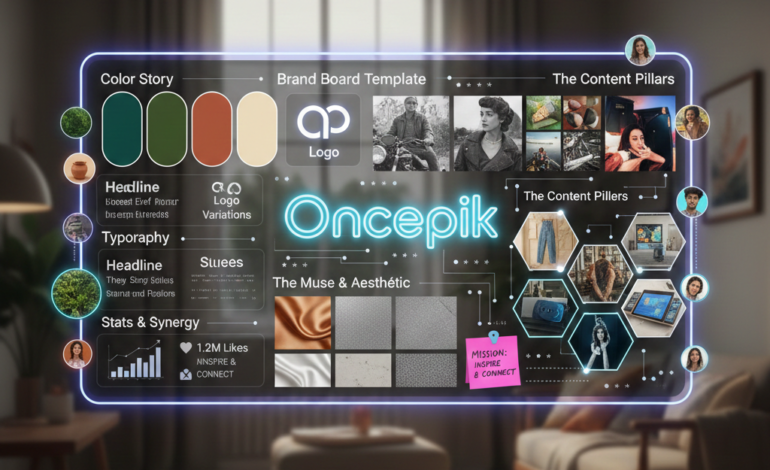

In the creative world, “organization” is often a dirty word. We’re told that messy desks lead to brilliant minds, but in 2026, the mess isn’t on our desks—it’s in our digital tabs.
Between mood boards on Pinterest, task lists in Notion, and reference videos scattered across YouTube, the creative flow often gets interrupted by the “app-switch fatigue.” But creators don’t think in spreadsheets. We think in moods, textures, and visual connections.
That is why Oncepik has surfaced as the definitive visual workspace for 2026. It is more than a project manager; it is a digital ecosystem designed to turn scattered ideas into cohesive chunks of success.
1. The Death of Text-Heavy Fatigue
For years, the creative community has struggled with “app-switching fatigue.” You find an aesthetic on Pinterest, take notes in a mobile app, and manage tasks in a corporate tool like Asana. By the time you’ve moved your idea through three different platforms, the creative spark is often gone.

Oncepik solves this by providing a visual-first interface. In Oncepik, your project isn’t a line of text in a database; it is a vibrant, interactive board.1
- Spatial Recognition: Our brains process images 60,000 times faster than text. Oncepik leverages this by allowing you to organize projects spatially. You can see the “vibe” of your entire campaign at a glance.
- The “Scrapbook” Aesthetic: Aligning with the 2026 “Notes App Chic” trend, Oncepik allows for a messy-but-functional layout. You can pin raw sketches next to polished final assets, keeping the evolution of your project visible.
2. Real-Time Collaboration
Success rarely happens in a vacuum. It happens in groups of talented people, ideas, and resources working in synergy. Oncepik is built specifically for this type of collaborative environment.
For Teams and Agencies
If you are managing a marketing team, the “Shared Workspace” feature is a game-changer. Unlike traditional tools where feedback is buried in a long thread of comments, Oncepik allows for Visual Feedback Loops.
- Interactive Pinning: Team members can drop pins on specific parts of an image or video to leave feedback. No more “I meant the blue on the left side of the second slide.”
- Live Updates: As a project moves from “Ideation” to “Execution,” the visual board updates for everyone in real-time, serving as a single source of truth.
For Influencers and Personal Brands
Building a brand like a celebrity—think of the strategic moves with meticulous visual identity. Oncepik allows solo creators to share specific “Mood” with photographers, stylists, or managers without giving them access to their entire private workspace.
3. The Digital “Treasure Map”
Traditional treasure mapping is static, but Oncepik turns them into actionable roadmaps.
Step 1: Ideation (The Search)
Use the Oncepik Browser Extension to “clip” inspiration from across the web. Whether it’s a specific fabric texture for a fashion project or a location still for a film, it all goes into your “Unsorted.”
Step 2: Investigation (The Layout)
Drag those items onto a board. Oncepik’s Smart Automation can suggest groupings based on color palette or file type, helping you spot patterns you might have missed.

Step 3: Implementation (The Task)
This is where Oncepik beats Pinterest. Every image on your board can be converted into a Task. You can set a deadline, add a checklist, and assign a budget directly to the visual element.
4. Oncepik vs. The 2026 Landscape
How does Oncepik hold up against the “Big Three” of digital organization?
| Feature | Notion | Oncepik | |
| Primary Use | Inspiration / Discovery | Databases / Wikis | Visual Production |
| Workflow | Linear / Feed-based | Hierarchical / Text | Spatial / Non-Linear |
| Task Integration | Non-existent | High (but text-only) | High (Visual-linked) |
| 2026 Vibe | Consumer-focused | Academic / Corporate | Builder / Creator Focus |
While Notion is excellent for knowledge management and Pinterest is great for passive browsing, Oncepik occupies the “middle ground” of action. It is the tool for people who are actually building the things they see on their mood boards.
5. Case Study
To understand the power of Oncepik, let’s look at how we use it here at Cluster Corner to manage our Star Profiles.
When tracking a breakout stories, our writers and researchers deal with:
- Audio/Video: Interviews where she discusses her accent training.
- Fashion: Red carpet lookbooks and brand partnerships.
- Social Context: 2025 dating rumors and public sentiment.
- Deadlines: Content calendars for our “Breakout Story” series.
In a traditional tool, these files would be buried in folders. In Oncepik, we can see categorize aesthetic, interview notes, or publishing schedule all on one screen. This visual “at-a-glance” management is how we can produce high-quality, deeply researched articles faster than the competition.
6. Embracing the “Imperfect by Design” Trend

As we move through 2026, the design world is moving away from “clinical perfection” and toward authenticity. The rise of “Explore core” and “Texture Check” aesthetics means that creators want tools that feel tactile.
Oncepik’s interface mimics the feeling of a physical desk. You can overlap images, use “digital washi tape” to mark connections, and use a dark-mode “Cinematic” view for late-night editing sessions. It doesn’t feel like a software application; it feels like a creative studio.
7. How to Get Started: Your First 30 Days on Oncepik
If you are ready to declutter your creative mind, here is the recommended setup:
- Day 1-7: The Great Migration. Spend 15 minutes a day moving your “open tabs” into Oncepik. Use the browser extension to save everything—from a tweet that inspired you to a 4K video reference.
- Day 8-15: Define Your Groups. Create three boards: “Current Work,” “Future Goals,” and “Personal Style.” Begin dragging your saved items into these three buckets.
- Day 16-30: Add Action. Look at your “Current Work” board. Pick three images and add a “Final Delivery” date to them. Watch how seeing the deadline next to the creative goal changes your productivity.
The Future is Visual
The world is getting noisier, and the tools we use to manage that noise will determine our success. Oncepik isn’t just a productivity tool—it’s a way to reclaim your creative focus. By prioritizing visual logic over text-heavy lists, it allows creators to stay in the “flow state” longer.
Whether you are managing a business, tracking celebrity trends, or just trying to organize your life’s best memories, Oncepik provides the “corner” you need to bring all your scattered together.